Updated October 30, 2026
As a rap artist, your website is the one place online that you fully own. Streaming apps and social platforms change their rules all the time, but your site and your fan list stay yours. It’s where fans stream your new release, buy merch and find your next show, and it’s where promoters, press and brands go when they want to book you.
This guide walks through how to make a rap artist website step by step: what to put on it, how to give it a professional look, how to connect your social media and how to promote it once it’s live. We’ll also look at real rapper websites, including a few we’ve built, and answer the questions artists ask most. Everything here works for any music artist website, whether you rap, sing or produce.
How to make a rap artist website: the short version
- Decide what the site needs to do: stream, sell, book shows or grow your fan list.
- Get a domain name with your artist name in it.
- Choose how to build it: a link page, a website builder or a custom site.
- Plan your pages: home, music, videos, shows, store, about and contact.
- Put your newest release and one clear button on the first screen.
- Add your music, videos and streaming links.
- Set up merch, beat sales and ticket links.
- Add an email or text sign-up so you can reach fans directly.
- Test it on your phone, then put the link everywhere.
What makes a rap artist website unforgettable
An unforgettable website looks like you, loads fast and makes it obvious what fans should do next. Most people will land on your site from the link in your bio, on their phone, with a few seconds to spare. If the first thing they see is your latest release and a big “Listen now” button, you’ve done most of the work.
When you create a website as a rap artist, keep these four things in mind:
- Design: the site should match your current era, from the album art to the colors and fonts, and it has to work on a phone first.
- Content: your music, videos, story, shows and merch, kept up to date. An old release on the home page tells fans the site has been forgotten.
- Social media integration: your site and your socials should point to each other, so fans can follow you anywhere in one tap.
- Promotion: a website only works if people find it, through search, social, email and the link in every bio.
The benefits of having your own musician website
Instagram, TikTok and streaming profiles are where fans discover you. Your website is where you turn that attention into something that lasts. Here’s what a rap artist website does for you:
- You own it: no algorithm decides who sees your release. Your domain, your content and your fan list stay with you, even if a platform changes or disappears.
- Direct fan contact: an email or text list lets you reach fans on release day without paying to boost a post.
- Credibility: promoters, venues, labels, playlist curators and brands look for an official site. It shows you take your career seriously.
- Revenue: sell merch, beats, music and VIP experiences on your own site, where you set the prices and keep the customer list.
- Visibility: when someone searches your name, an official site helps you show up ahead of fan pages and old news.
- Branding: one place that shows your whole world, not just your latest post.
How to make a rap artist website, step by step
Whether you build it yourself or hire someone, these are the steps that matter.
Step 1: Decide what your website needs to do
Pick the one or two jobs that matter most right now. An artist dropping a debut project needs streams and sign-ups. An artist with a tour coming up needs ticket sales. A producer needs to sell beats. An artist pitching for features, shows or brand deals needs a press kit. Your answer decides what fans see first on your home page.
Step 2: Get a domain name
Use your artist name. Yourname.com is ideal. If it’s taken, try adding “music” or “official”, like yournamemusic.com or yournameofficial.com, and keep the same spelling you use on streaming and social. Set up a matching email address, such as booking@yourname.com, so promoters and press see a professional contact instead of a personal inbox.
Step 3: Choose how you’ll build it
There are three common ways to make a rap artist website. Here’s how they compare:
| Link-in-bio page (Linktree and similar) | Website builder (Bandzoogle, Squarespace, Wix) | Custom website (WordPress or Shopify, built for you) | |
|---|---|---|---|
| Good for | Sending fans to your streaming links fast | Independent artists who want to build it themselves | Artists, labels and managers who want a site that stands out and grows with them |
| Design | Same basic layout as everyone else | Templates you customize | Designed around your brand and your releases |
| Merch and beats | Links out to other stores | Built-in store, often with limits | Full store for merch, beats and bundles |
| Fan sign-ups | Basic | Built in or through add-ons | Connected to the email or text tool you use |
| Who does the work | You | You | Your web designer |
| Watch out for | It isn’t really a website, so it doesn’t build your search presence | Time spent learning the builder, and template limits as you grow | A bigger upfront investment, so choose the team carefully |
Many artists start with a builder and move to a custom site when their career picks up. Either way, use your own domain from day one so you never have to change the link fans know.
Step 4: Plan your pages
Most rap artist websites need the same core pages. If you’re just starting out, these can all be sections on one long home page.
- Home: your newest release, next show, merch and sign-up.
- Music: your discography, with streaming links for every project.
- Videos: music videos, live clips and behind-the-scenes content.
- Shows or tour: dates, cities and ticket links.
- Store: merch, music and beats.
- About and press kit: your story, press photos and highlights.
- Contact: booking, management and press contacts.
Step 5: Design the first screen
The first screen is everything a visitor sees before they scroll. On a rap artist website, it should answer two questions right away: who is this, and what’s new? Here’s what that looks like on a sample site we designed for a fictional artist.
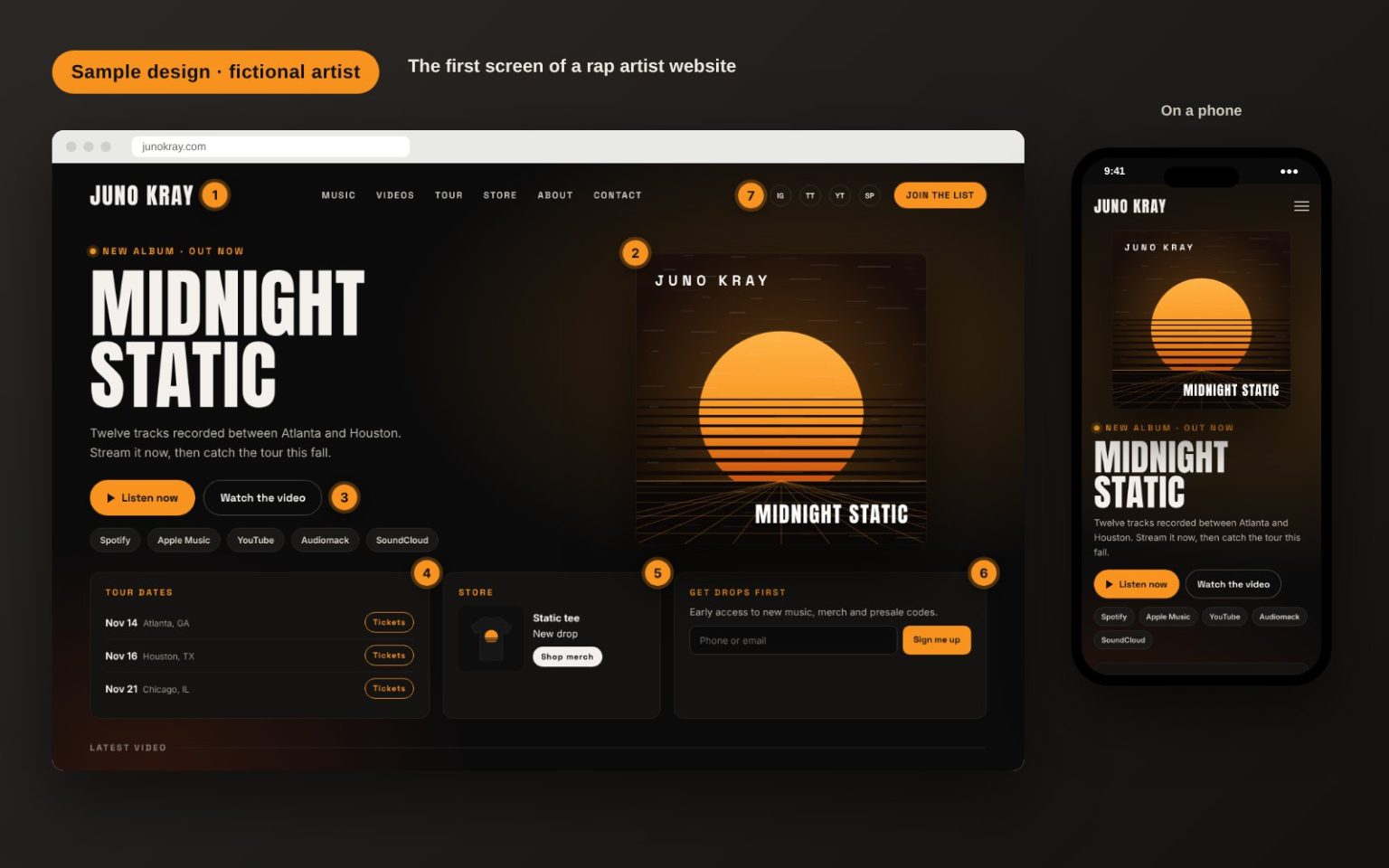
- Your name or logo, big enough to read on a phone.
- Your newest release, with the cover art front and center.
- One main button, like “Listen now”, plus links to every streaming platform you’re on.
- Your next shows, each with a ticket link.
- Merch, starting with your newest drop.
- A fan sign-up that gives people a reason to join, like early access or presale codes.
- Social links and a “Join the list” button in the header, so they show on every page.
On a phone, the order matters even more. Keep the release, the main button and the sign-up on the first screen, and let everything else stack below.
Step 6: Add your music and videos
Embed players from Spotify, Apple Music, SoundCloud or Audiomack so fans can listen without leaving your site, and link to every platform where your music lives. Give each project its own release page with the cover art, tracklist, credits, streaming links and music video. Embed your music videos from YouTube instead of uploading the files to your site. That keeps your pages fast, and the plays still run through YouTube. If your lyrics matter to your fans, add them to the release pages too.
Step 7: Set up merch, beats and ticket sales
Selling on your own site puts the fan relationship in your hands. You have a few options:
- Merch: a Shopify store or WooCommerce on WordPress, with print-on-demand if you don’t want to hold stock.
- Music and beats: sell downloads, beat licenses and stems directly, or connect a beat store like BeatStars or Airbit if you’re a producer.
- Tickets: list every show with a link to the ticket seller, or add a Bandsintown tour-date widget so new dates show up on their own.
Step 8: Add an email or text sign-up
Your fan list is the most valuable thing your website can build. Put a sign-up form on the home page and in the footer, and give fans a reason to join: early access to new music, presale codes, merch drops or unreleased snippets. Tools like Mailchimp, Klaviyo and Laylo connect to most websites. If you collect phone numbers for text alerts, get clear permission and include a way to opt out.
Step 9: Test it, then put the link everywhere
Before you share the site, open it on your own phone and on a friend’s. Check that every button works, the music plays, the store checks out and the sign-up form actually sends. Make sure pages load quickly, because slow sites lose visitors before the music starts, and reliable website hosting makes a big difference. Then connect Google Search Console and Google Analytics so you can see who’s visiting. Finally, add your website link to your Instagram, TikTok, YouTube and X bios, your streaming profiles where they allow it, and every press kit and email you send.
Types of content to include on your rap artist website
Here’s what fans, promoters and press look for on a rap artist website:
- Artist biography: a short version of two or three sentences for fans and a longer one for press. Tell people where you’re from, what your music sounds like and what you’ve done so far.
- Music: your latest release first, then your catalog, with streaming links for each project.
- Photos: current, high-quality photos, plus a few press photos that media can download.
- Videos: music videos, live performances and behind-the-scenes clips.
- Shows and events: upcoming dates with ticket links. Remove past dates or move them to a past shows list.
- Merch: clothing, vinyl, signed items and bundles.
- Electronic press kit (EPK): your bio, press photos, streaming and show highlights, press quotes and links to your strongest songs. Promoters and blogs will thank you.
- Contact information: separate booking, management and press contacts, so the right messages reach the right people.
Creating a professional look for your website
A professional look doesn’t mean playing it safe. It means everything on the site feels intentional. These tips help:
- Build around your current era: pull colors, textures and type from your latest cover art so the site and the music feel connected. Refresh it when a new era starts.
- Use real, high-quality photos: shots from your latest photo shoot beat stock photos. Fans want to see you.
- Keep the color palette tight: one or two main colors and one accent color for buttons is plenty.
- Pick fonts that read well: a bold display font for headlines and a clean font for everything else. Two fonts are usually enough.
- Make the navigation simple: five or six menu items at most, with the most important ones first.
- Don’t autoplay music: most browsers block it anyway, and it drives people away. Let fans press play.
- Keep the words short: clear headlines and short paragraphs work better than long blocks of text.
Integrating social media into your website
Your website and your social accounts should work together. Here’s how to connect them:
- Add social media buttons: put icons for Instagram, TikTok, YouTube, X and your streaming profiles in the header or footer of every page.
- Embed your latest content: add your newest YouTube video or a few recent posts to the home page. Keep embeds to a minimum, though, because each one slows the page down.
- Use a social media feed with care: a live feed or social wall keeps the site looking fresh, but it can make pages slow on phones. If you add one, put it lower on the page.
- Make your site your link in bio: instead of a separate link page, point your bio link to your website or to a simple links page on your own domain.
- Share website-only moments: post about things fans can only get on your site, like a presale, a signed bundle or an early listen, so followers have a reason to visit.
Promoting your website and your music
Once your site is live, send people to it every chance you get:
- Search engine optimization (SEO): use your artist name in your page titles, write a real bio and release pages people can find, and follow Google’s SEO starter guide. Your goal is to own the search results for your own name.
- Release campaigns: build a page for each release before it drops, with a pre-save link, then switch it to streaming links on release day.
- Email and text: message your list on release day, before a presale and when new merch drops.
- Social media: link to your site in posts, stories and video descriptions, not just in your bio.
- Paid ads: if you run paid social ads, send them to a release page or a store page on your site instead of the home page, so you can see what works.
- Press and playlists: include your website link when you pitch blogs, playlist curators and promoters. Links from music sites also help your site show up in search.
Examples of unforgettable rap artist websites
Looking at real rapper websites is the quickest way to figure out what you want. Here are three artist sites we’ve built, followed by two well-known examples.

Built by Pure Code Digital
King Von Official
The official website for King Von. It opens with an animated intro and an Enter button, then brings his music, merch and updates together for fans.
Built by Pure Code Digital
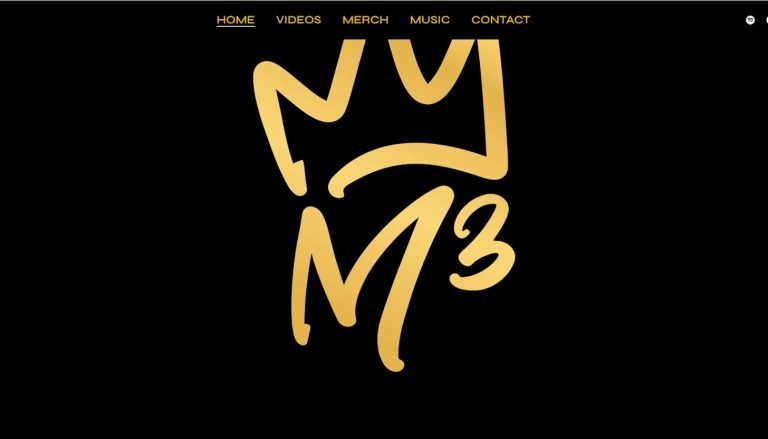
M3
An artist site that pulls music, videos and merch into one place and links out to every streaming platform.
Built by Pure Code Digital
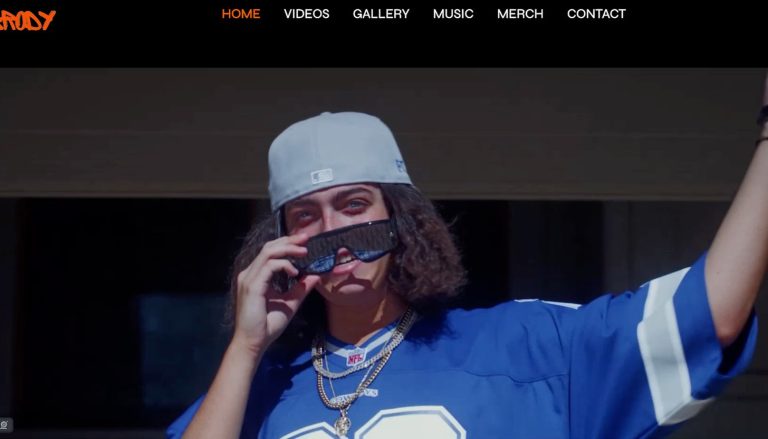
Brody
An artist site that opens with full-screen video, then leads into gallery, music and merch sections.
You can see more of our recent projects too. And two big-name sites worth a look (they change often; these were checked in October 2026):
- Drake: Drake Related (drakerelated.com) is built as a set of rooms you explore, like a studio, a bedroom and a pool, with his albums, projects and store along the way. It shows how a strong concept can turn a merch store into an experience.
- Chance the Rapper: chanceraps.com opens on a simple “click to enter” screen that leads straight into his Star Line store. If selling is the main job of your site, getting fans to the store in one tap makes sense.
What these sites have in common is a clear point of view and an obvious next step, whether that’s listening, shopping or signing up.
Tips for creating an unforgettable musician website
Before you launch, and every time you update the site, run through this checklist:
- Your newest release is on the first screen.
- There’s one main button, and it works on a phone.
- Every streaming platform you’re on is linked.
- Show dates are current, and every one has a ticket link.
- The store checks out from start to finish.
- The sign-up form sends, and new fans get a welcome email or text.
- Booking, management and press contacts are easy to find.
- Pages load quickly on a phone.
- The site is on your own domain, with the padlock (SSL) showing in the browser.
- You update it at every release, tour and merch drop.
Rap artist website FAQs
How much does a rap artist website cost?
It depends on how you build it. Website builders charge a monthly or yearly plan. A custom website depends on how many pages you need and on features like a store, beat sales or fan sign-ups. Prices vary from project to project, so for a custom build the quickest way to a real number is our instant quote tool, or you can contact Pure Code Digital.
Can I make a rap artist website for free?
Yes. Many website builders and link pages have free plans. The catch is that free plans usually put the builder’s name in your web address and its branding on your pages, and they limit features like selling merch. Your own domain name is a small yearly cost and makes the site look far more professional, even if everything else is free.
What should be on a rapper’s website?
At minimum: your newest release with streaming links, a short bio, photos, music videos, upcoming shows, merch, a fan sign-up and booking contacts. As your career grows, add a release page for each project and an electronic press kit.
Do I need a website if I already have Instagram and Linktree?
Social media and link pages help fans find you, but you don’t control them. A website gives you a home you own, lets you sell directly, helps you show up when people search your name and builds a fan list you can reach any time. Most artists use all three, with the website as the home base.
Which website builder should a rapper use?
If you’re building it yourself, a music-focused builder like Bandzoogle or a general builder like Squarespace or Wix will work. If your site is mostly a store, Shopify is made for selling. If you want a site designed around your brand that can grow with you, a custom WordPress or Shopify website built by a web designer is the way to go.
How long does it take to make a rap artist website?
A simple builder site can be ready in a weekend if your photos, music links and bio are ready to go. When Pure Code Digital builds a custom artist website, it usually takes one to two weeks from start to launch. Bigger builds, like a full store or beat shop, take longer.
Can I sell beats and merch on my own website?
Yes. You can sell merch, music downloads, beat licenses and bundles right from your site, with the payments going to you. A custom store also lets you run presales, limited drops and signed bundles for your most loyal fans.
Website design services for musicians
If you don’t have the time or skills to create a website yourself, a web designer can handle it from planning to launch. Pure Code Digital offers rap artist web design for independent artists, labels, producers and managers. We build custom sites with music, merch, shows and fan sign-ups, like the King Von Official site above, and we work with artists anywhere in the US.
Ready for a website that looks like your music?Tell us about your project for a free quote, or see a price in a couple of minutes with our instant quote tool. You can also call (877) 542-7974.
Conclusion
An unforgettable rap artist website doesn’t need to be complicated. Get your own domain, put your newest music and one clear button up front, make it easy to buy merch, find shows and join your list, and update the site every time you drop.
Follow the steps in this guide and your website becomes the home base for your whole career, one that leaves a lasting impression on your fans and that no algorithm can take away.