
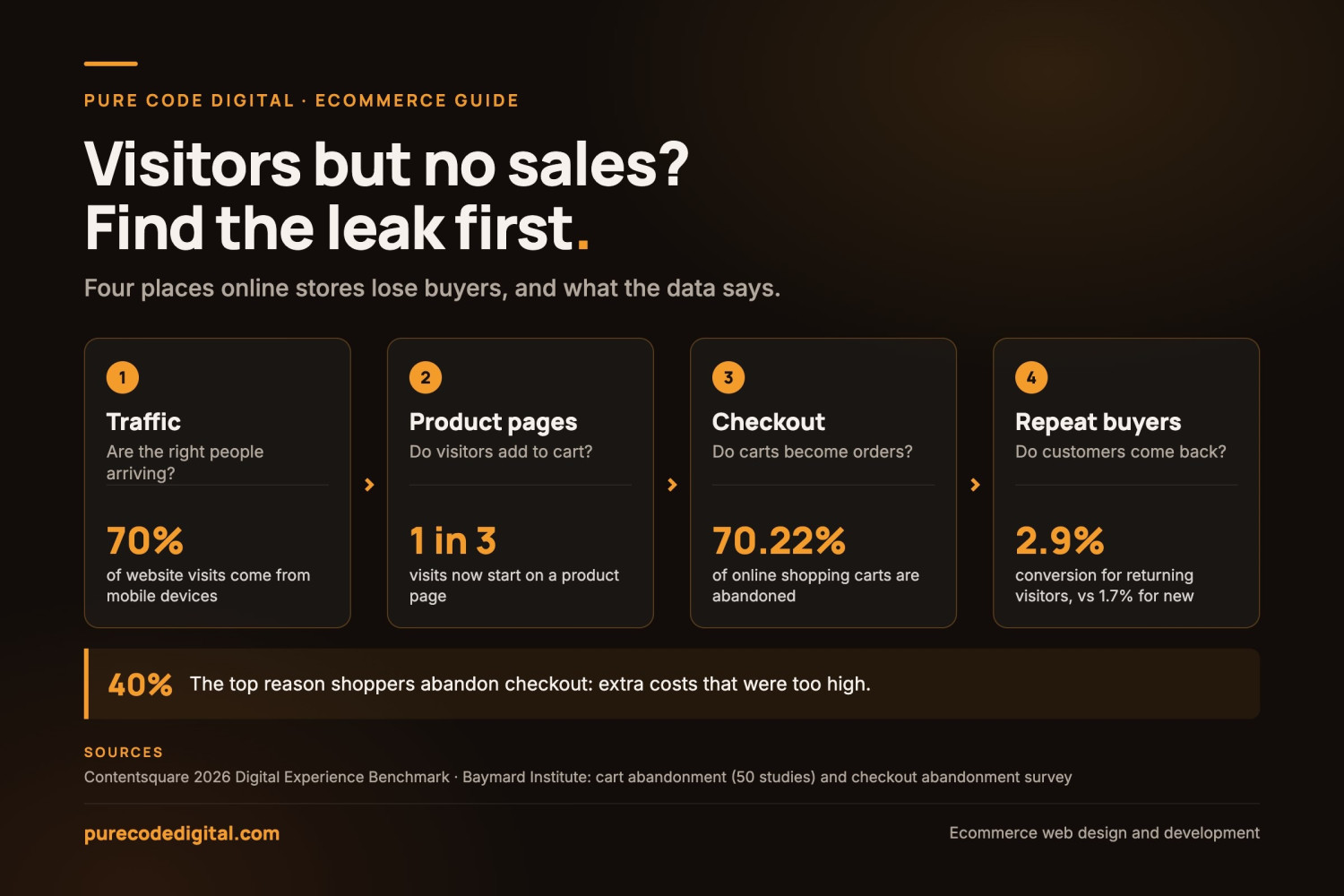
If your online store gets visitors but very few orders, something between the first click and the checkout is turning buyers away. That’s frustrating, but it’s rarely a mystery once you know where to look, and most of the causes can be fixed.
This guide shows how to increase ecommerce sales in the order that works: find the step where shoppers drop off, then fix that step first. You’ll see what a normal conversion rate looks like and which fixes matter most. We’ll also cover how to reduce cart abandonment, and how to tell when the problem isn’t your ecommerce website design at all.
Start here
First, Find Where You’re Losing Sales
Before you try to increase ecommerce sales, find the step where people give up. A store that attracts the wrong visitors needs a different fix than a store that loses people at checkout. Open your analytics (Google Analytics 4, or the reports in Shopify or WooCommerce) and look at four steps.
Traffic
Are enough of the right people arriving?
Look at where your visits come from. If most come from one viral post, or from searches that have little to do with what you sell, few of those visitors were ever going to buy. The fix is better targeting, not just more traffic.
Product pages
Do visitors add anything to the cart?
Compare product page views with add-to-cart clicks. If plenty of people look but few add, the page isn’t answering their questions about the product, the price or the delivery.
Cart and checkout
Do carts turn into orders?
If people add to cart and then leave, the checkout is costing you sales. This is where surprise shipping costs, forced account sign-ups and long forms do their damage.
Repeat customers
Do buyers come back?
If first orders look healthy but almost nobody buys twice, the store works, but nothing brings people back after the first order.
Most stores have one weak step that matters more than the others. Fix that one first, then check the numbers again before you move on.
Benchmarks
What’s a Normal Ecommerce Conversion Rate?
Your ecommerce conversion rate is the share of visits that end in an order. There’s no single right number, but benchmarks give you a rough baseline to compare against.
Other studies come in lower: Statista put the share of global ecommerce visits that ended in a purchase at 1.4% in the first quarter of 2026. What you sell matters even more. In Shopify’s conversion rate benchmarks, pet care stores averaged 5.7% and beauty and personal care 5.32%, while home and furniture averaged 1.29% and luxury and jewelry 0.63%. The more expensive and considered the purchase, the lower the rate.
If you’re well below the range for your type of product, or your mobile rate is a small fraction of your desktop rate, you know where to start.

The fixes
How to Increase Ecommerce Sales: 12 Fixes That Matter
Once you know which step is leaking, start with the fixes for that step. They’re grouped in the order shoppers move through your store.
Getting found and getting around
Attract shoppers who are ready to buy
More traffic only helps if it’s the right traffic. Good ecommerce marketing strategies start with people who are already looking for what you sell. That means product and category pages written for the searches they make, emails to past customers, and ads aimed at people who have already visited. If search is a big part of your plan, our SEO services can help with that side.
Make products easy to find
Keep the main menu to the categories people actually shop by, and move pages like returns or FAQs to the footer. Use plain labels, such as “Men’s Running Shoes” instead of “Footwear.” Put the search bar where people can see it. Then check that it finds the right products, even when someone misspells a name.
Make the store fast and easy to use on a phone
With most visits on mobile, test your store on a real phone, not just a desktop browser. Keep buttons big enough to tap, keep the price and the Add to Cart button near the top, and compress your images. Google’s free PageSpeed Insights shows what slows a page down. If your store runs on WordPress and WooCommerce, our WordPress speed guide covers the fixes that make the most difference.
Product pages that sell
Show the product properly
One in three visits now starts on a product page, according to Contentsquare, so treat every product page like a front door. Use sharp photos from several angles, at least one photo of the product in use, and a short video where it helps. Shoppers can’t pick the product up, so your photos have to do that job.
Write descriptions that answer questions
Lead with what the product does for the buyer. Then give the details people need to decide: size, materials, what’s in the box and how to care for it. Write your own copy instead of reusing the manufacturer’s text, which appears word for word on every other store that sells the same item. A few short questions and answers on the page can settle the doubts that would otherwise stop a sale.
Show the full price and delivery date early
Don’t save shipping costs and taxes for the last step. Show an estimate on the product page or in the cart, along with when the order will arrive. If you offer free shipping above a certain order value, say so right next to the price.
Building trust
Give people reasons to trust you
Show customer reviews, including the less glowing ones, and reply to them. Make your returns policy easy to find and easy to understand. Show a phone number or email address, an About page with real people, and the payment options you accept. Ask buyers for a review a week or two after delivery, and use what they tell you to fix problems in the store.
Speak to the people who actually buy
Look at who already orders from you. Bargain hunters, gift buyers and enthusiasts want different things. Match your photos, headlines and offers to your real customers instead of writing for everyone at once.
Checkout
Make checkout short and simple
Allow guest checkout, ask only for what you need, and show people how many steps are left. Offer the payment methods your customers already use, such as cards, PayPal, Apple Pay and Google Pay, plus buy now, pay later if it suits what you sell. Baymard Institute estimates that the average large online store could raise its conversion rate by 35.26% through better checkout design alone. Its checkout usability research shows what to change.
After the first visit
Win back people who left
Send an automatic email, or a text if they opted in, when someone leaves items in their cart. A friendly reminder with a photo of the item often works without a discount. Combine it with targeted social media ads that feature the exact items they left behind.
Turn first orders into repeat orders
Returning visitors convert at 2.9% compared with 1.7% for new visitors, according to Contentsquare, so it pays to bring people back. Collect email addresses at checkout and send useful follow-ups: shipping updates, care tips, a reminder when it’s time to reorder and early access to new products.
Measure, test and add tools that earn their keep
Check your conversion rate, cart abandonment rate and average order value every month. Run A/B tests on one thing at a time, like a product page layout or a checkout button, and keep the version that wins. Heatmaps and session recordings show where people get stuck. AI-powered product recommendations and a chatbot that answers product questions can add sales too, once the basics above are in place.
Checkout data
How to Reduce Cart Abandonment
Some abandoned carts are normal. Baymard found that 42% of US online shoppers had abandoned a cart because they were just browsing. Most of the rest can be fixed. When Baymard asked shoppers why they left during checkout, leaving out the just-browsing group, these were the top reasons:
Baymard notes that many of these problems can be solved through design changes alone. Fixing the ones that apply to your store is one of the most direct ways to increase ecommerce sales without buying more traffic.
Before you rebuild
When the Problem Isn’t Your Website
Sometimes the store is fine and the issue is somewhere else. Check these before you rebuild anything.
Price
If the same product is cheaper on Amazon or a competitor’s site, shoppers will find out. Compete on what comes with the product, such as faster shipping, better support or bundles, or take another look at the price.
The product or the offer
If people simply don’t want what you sell, no checkout fix will help. Ask a few people who didn’t buy what stopped them, and look at what visitors search for on your site.
Too little traffic to judge
With a few hundred visits a month, a handful of orders is normal. Work on getting found before you worry about small changes in conversion rate.
Stock and delivery
Products that are often out of stock, long shipping times and unclear returns lose sales however good the site looks.
If you’ve ruled these out and visitors still aren’t buying, the website is the place to look.
FAQ
Ecommerce Sales: Common Questions
Why does my online store get traffic but no sales?
Usually for one of three reasons. The visitors aren’t the right people, the product pages don’t answer their questions, or the checkout puts them off with extra costs, forced sign-ups or a long form. Your analytics will show which step people leave at, and that tells you which problem you have.
What is a good ecommerce conversion rate?
Averages sit between about 1.4% and 2.7% of visits, but it depends heavily on what you sell. Everyday, lower-priced products convert better than expensive ones, and desktop visits convert better than mobile. Compare yourself with stores like yours, and with your own numbers from a year ago.
How can I increase ecommerce sales quickly?
The quickest wins are usually in the cart and checkout. Show shipping costs early, allow guest checkout, add the payment methods your customers use and set up abandoned cart emails. These change what happens to the visitors you already have, so you don’t have to wait for more traffic to see a difference.
Will a new website increase my sales?
Only if the website is what’s holding you back. A redesign helps when the store is slow, hard to use on a phone or doesn’t look trustworthy. If the real issue is price, product or too little traffic, fix that first.
How much does it cost to fix an ecommerce website?
Prices vary with what needs fixing. Small changes, like checkout settings or better product pages, take far less work than a full rebuild. For a figure for your store, use our instant quote tool or get in touch.
Need a hand?
Want a Second Opinion on Your Store?
Some of these fixes take an afternoon. Others, like speeding up a slow theme or rebuilding a clumsy checkout, take a developer. Our ecommerce web design team builds and improves online stores on WordPress and WooCommerce, including custom checkout, shipping and pricing rules. Still choosing a platform? Our WordPress vs Shopify comparison walks through the trade-offs.